Guide · General
How Much Does Cloud Storage Cost in 2026: Plans and Fees
How much does cloud storage cost in 2026? Free tiers, 2 TB plans, team seats and pay-per-GB fees, with each vendor price and its check date.
By the Rankozo research desk · Updated November 23, 2026 · 13 min read
The smallest advertised storage rate rarely produces the smallest monthly bill. A mainstream 2 TB personal plan costs $9.99 per month at Google One and at iCloud+, according to the Cleanor 2026 Cloud Storage Price Index, yet business plans bill per seat and metered object storage charges per GB plus transfer on top.
The useful question is how much the customer pays across the full billing period, for every required user, under the expected access pattern. A personal photo library, a shared business workspace and an application backup each follow a different cost model, so the right comparison starts with the workload rather than the sticker price.
The table below breaks down paid personal plans by capacity, with monthly and annual billing side by side.
Table of Contents
- Paid Cloud Storage Prices by Capacity
- Free Storage Allowances and Where They Run Out
- Billing Terms, Seat Counts and Team Costs
- Why Pay-As-You-Go Storage Adds Charges
- Total Monthly Cost for Common Workloads
- Pick the Cheapest Plan That Fits Your Storage Use
Paid Cloud Storage Prices by Capacity
Two 2 TB plans can share a $9.99 sticker price and still produce different yearly bills. The Cleanor 2026 Cloud Storage Price Index lists Google One 2 TB at $9.99 monthly or $99.99 annually, iCloud+ 2 TB at $9.99 billed month to month, and Dropbox Plus 2 TB at $11.99 monthly, or $119.88 a year on annual billing.
Paid personal cloud storage plans by capacity
All prices are in US dollars.
| Capacity | Provider and plan | Monthly price | Annual price | Note |
|---|---|---|---|---|
| 100 GB | Google One | $1.99 | $23.88 over twelve monthly payments, calculated | Shares the allowance with Gmail and Google Photos |
| 2 TB | Google One | $9.99 | $99.99 annual subscription | About $8.33 a month when paid upfront |
| 2 TB | Apple iCloud+ | $9.99 | $119.88 over twelve monthly payments, calculated | Billed month to month |
| 2 TB | Dropbox Plus | $11.99 | $119.88 annual subscription | Shown as a $9.99 monthly equivalent on annual billing |
An annual subscription and a year of monthly payments aren't the same product. The annual column separates an upfront subscription price from a calculated spending total. Google One's $99.99 subscription is a genuine discount, working out near $8.33 a month. Dropbox's $119.88 charge costs less than paying $11.99 twelve times. The iCloud+ figure is twelve monthly payments added together, so a buyer who reads it as an annual offer would be mistaking ordinary billing for a discount.
The capacity jump is steep. Moving from Google One's 100 GB tier to its 2 TB tier raises the monthly bill from $1.99 to $9.99, roughly five times the price for about twenty times the storage. That trade favors a large photo library or shared family storage and penalizes a buyer whose files would fit comfortably in the smaller tier.
Compare usable capacity, not just the rate
The Cleanor index puts the effective rate for the listed 2 TB Google One and iCloud+ plans at approximately $0.005 per GB, compared with approximately $0.006 per GB for Dropbox at its higher monthly price. On Dropbox's annual billing that gap largely closes, which is why the billing term matters as much as the sticker price.
A per-GB figure also says nothing about workflow. The 100 GB Google One tier shares its allowance with Gmail and Google Photos, so part of the capacity is spoken for before a single document is uploaded. For an individual, the 2 TB tier is a sensible point to stop and reassess before paying for space the library may never use.
Rankozo's price indexes follow the same convention, quoting the cheapest paid plan shown on each vendor's US pricing page with the check date recorded.
Buying rule: Choose the smallest tier that holds the existing library plus plausible growth, then compare the annual commitment with the cost of twelve monthly payments before paying upfront.
Free Storage Allowances and Where They Run Out
Free capacity is an account-level budget before it is a folder limit. The Bravotech 2026 cloud storage pricing tracker lists 15 GB for Google, shared across Google Drive, Gmail and Google Photos, 5 GB each for Microsoft OneDrive and iCloud, and 2 GB for Dropbox, with first paid steps at Google One 100 GB for $1.99 monthly, iCloud+ 50 GB for $0.99 monthly, and Microsoft 365 Basic 100 GB for $1.99 monthly.
That distribution changes the trigger point. A Google account can run short because Gmail and Photos consume the same pool as Drive, so a nearly empty Docs folder can still sit inside a nearly full allowance. The practical line is the provider's account storage dashboard, where photos, mail and synchronized files are totaled together.
Check what actually consumes the allowance
Start with the account breakdown, then price the next tier before cleanup turns into rushed deletion.
- Inventory the existing library. Count phone backups, photos, documents and queued uploads shown in the storage breakdown.
- Identify shared products. Confirm whether email and automatic backups draw from the same allowance as manual uploads.
- Compare occupied space with the limit. Add content waiting to upload, because paused sync can hide a backlog that still needs a destination.
A paused phone upload can make usage look comfortable while the camera roll keeps growing off-device. Free plans fit light use only when every intended backup fits inside the allowance with headroom for automatic uploads to keep working.
A free plan is sufficient when intended backups and files fit together, with enough headroom to keep automatic uploads working.
When the allowance nears full, compare the smallest paid tier against the cost of deleting useful material. Deliberate cleanup reduces spending; hurried deletion usually just postpones the same upgrade.
Billing Terms, Seat Counts and Team Costs
Billing period and pricing unit change the bill independently. A discounted annual rate can still be expensive if the customer must buy unused seats. Conversely, a higher monthly rate can cost less overall when the account won't remain active for the full commitment.
The Cloudslinker 2026 pricing comparison lists Google One 2 TB at $99.99 annually, approximately $8.33 per month, versus $9.99 on monthly billing, and Dropbox Plus at $9.99 per month billed annually versus $11.99 month to month; it also records a separate Dropbox monthly listing of $19.99, with exact vendor-page check dates unverified. The disagreement means the checkout route must be recorded rather than choosing whichever quote looks cheapest.
An annual-billing monthly equivalent describes the cost spread across the subscription period. It doesn't mean the customer can make monthly payments at that rate or cancel without the annual commitment.
Resolve the billing term before comparing vendors
Google's listed annual offer reduces spending by about seventeen percent relative to maintaining the listed monthly plan for a full year, calculated from the comparison's prices. That saving matters only if the buyer expects to keep the subscription and can accept the payment timing.
Dropbox requires particular care because the comparison contains conflicting month-to-month listings. The safe conclusion isn't that one quote must be current. It's that an analyst needs the plan name, capacity, billing toggle, purchase route and checkout date before treating either quote as a verified offer.
There is also an arithmetic distinction worth preserving: the listed Dropbox annual subscription total belongs to annual billing, not to a year of the higher monthly payments. A comparison shouldn't label the same annual total as both.
Count the units the vendor sells
A $10 per user plan and a $10 per account plan aren't the same deal. Rankozo's explanation of software pricing models helps distinguish the unit being sold before buyers compare totals.
The Bravotech 2026 cloud storage comparison lists Dropbox Standard from 3 TB at $15 per user monthly, billed annually, Dropbox Advanced from 15 TB at $24 per user monthly with a three-user minimum, and Microsoft 365 Family with 2 TB shared by up to six people at $12.99 monthly or $129.99 annually; exact vendor-page check dates are unverified. Its Advanced example therefore requires $72 monthly before taxes, while fully using the Family plan's listed participant allowance works out to approximately $2.17 per person monthly, calculated from its monthly price.
Team and shared plans with seat minimums
The following are 2026 comparison listings, not newly checked vendor quotes.
| Plan | Pricing unit | Minimum | Listed price | Cost at minimum per month |
|---|---|---|---|---|
| Dropbox Standard, from 3 TB | Per user, billed annually | Seat minimum unverified | $15 per user | $15 multiplied by the required seats; minimum total unverified |
| Dropbox Advanced, from 15 TB | Per user | Three users | $24 per user | $72 before taxes |
| Microsoft 365 Family, 2 TB | Per plan, shared | One subscription, up to six people | $12.99 monthly or $129.99 annually | $12.99 on monthly billing |
The Standard row deliberately doesn't infer a seat minimum from Advanced. Similar branding doesn't establish identical purchase requirements.
Family sharing also isn't automatically a substitute for business storage. A procurement decision should check administrative control, ownership of departing employees' files, permissions and whether the plan is appropriate for the intended use. Capacity alone can't establish suitability.
Build a comparable commitment total
A buyer can normalize competing quotes with this procedure:
- Convert annual subscriptions to monthly equivalents. Divide the annual amount by twelve, while keeping the actual upfront payment visible.
- Apply the seat count and minimum. Multiply the unit price by the billable users, including seats required by the purchase rules.
- Add applicable tax and currency conversion. Keep those separate from the vendor's list price so finance can reconcile the quote with the eventual charge.
- Compare the full twelve-month commitment. Include the payment schedule, renewal exposure and any seats that cannot be removed during the term.
The break-even question is practical rather than promotional. If a project may end, a contractor may leave or a team may downgrade before the annual commitment pays back, monthly billing can be the cheaper decision.
Commitment check: A discount on unused months or mandatory unused seats isn't a saving.
Why Pay-As-You-Go Storage Adds Charges
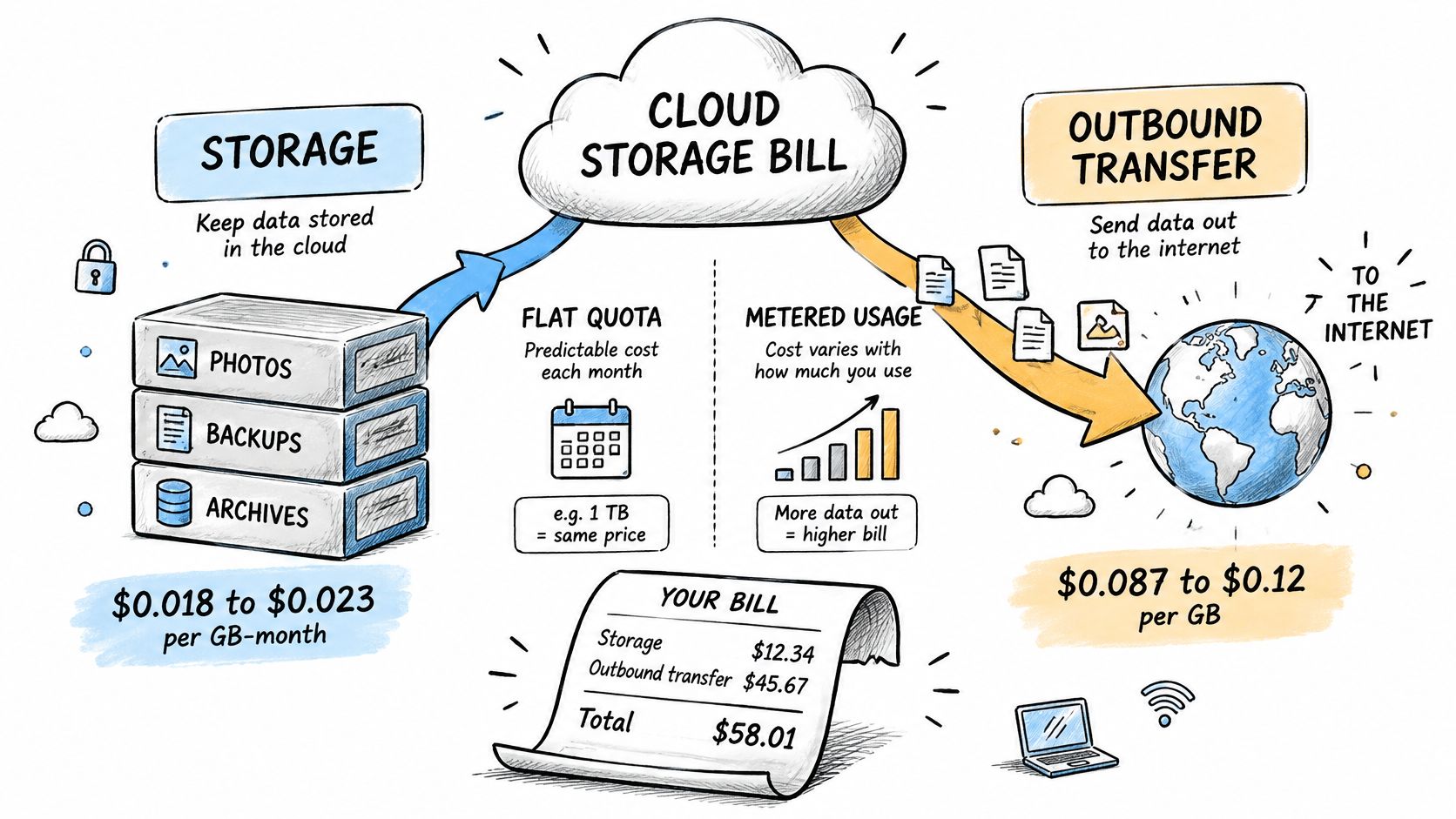
Standard object storage and outbound transfer use different billing units, so they should not be compared as interchangeable per-GB prices. Storage is metered by capacity held over time. Transfer is metered when bytes leave the provider, which means a dataset can be cheap to park and expensive to use.
Metered storage rates and what triggers them
| Charge | Typical rate | Applies when | Source |
|---|---|---|---|
| Storage | $0.018 to $0.023 per GB-month | Data is held in standard object storage | GigeNet egress explainer |
| Outbound transfer, first tier | $0.087 to $0.12 per GB | Data is downloaded, restored or migrated out | GigeNet egress explainer |
| Internet transfer, Google Cloud first tier | $0.085 to $0.12 per GB | The selected routing tier and transfer route apply | Veeam egress guide |
The Veeam egress guide describes Google Cloud first-tier internet-transfer pricing of approximately $0.085 to $0.12 per GB, depending on tier. A transfer estimate also needs the source region, destination and routing choice, because the same volume can price differently once those inputs change.
The bill separates capacity from the actions performed on that capacity.
Identify every billable event
A consumer subscription generally sells a fixed quota for a recurring fee. Developer-oriented object storage can charge for holding data, making API requests, retrieving archived objects, replicating copies and transferring bytes.
- API operations require an estimate of reads, writes and other requests, not just occupied space.
- Retrieval and retention rules matter when archived data is accessed or deleted before its minimum storage period.
- Replication and routing require a clear account of where copies live and where traffic travels.
A lower storage rate does not establish a lower total. Predictable quota pricing can suit ordinary file storage, while metered infrastructure becomes easier to budget when the operator controls access and transfer volumes. Application infrastructure also needs a broader cloud hosting price assessment rather than treating storage as the entire hosting bill.
Separate regional assumptions
For the United States, United Kingdom, European Union, India and Australia, a comparable quote should record list price, tax treatment, billing currency, included capacity, data residency and transfer assumptions. The useful comparison is the full bill under the same workload, not the same headline rate converted into another symbol.
A regional quote should also state which events are included, which are metered and which minimum periods apply. Relabeling a US-dollar figure with a local currency symbol is not a regional comparison.
Total Monthly Cost for Common Workloads
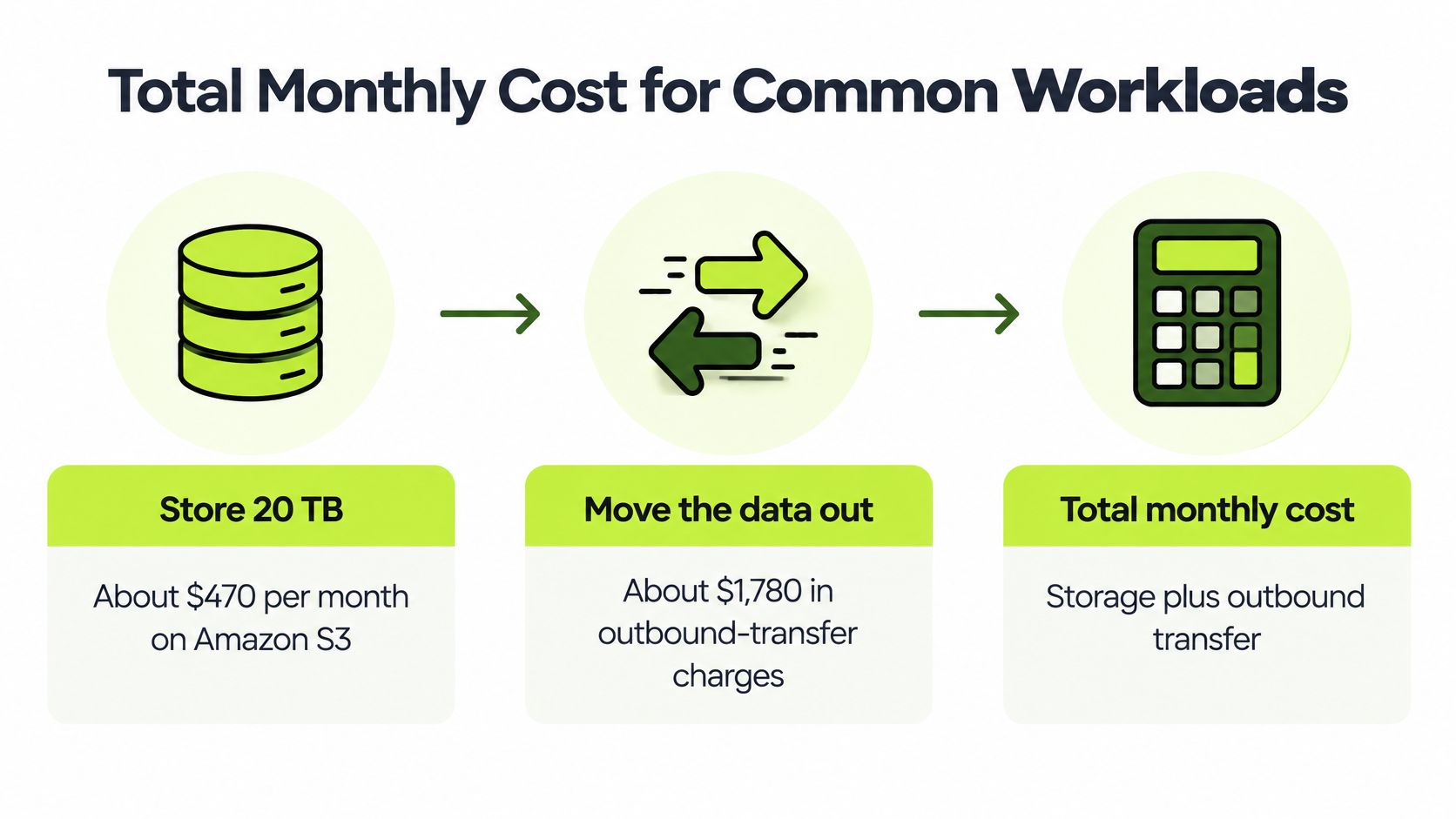
Storing 20 TB on Amazon S3 runs about $470 per month, while downloading that same dataset once costs about $1,780 in outbound transfer, according to the GigeNet egress explainer. Combined, a store-and-exit month reaches about $2,250 before API requests or other billable operations. Storage is the smaller line item.
The $1,780 transfer charge is a one-time event. The $470 storage charge recurs whether the data moves or not. Which pattern dominates the bill depends on how often the data leaves.
Monthly cost of a 20 TB dataset by access pattern
This calculated example applies GigeNet's Amazon S3 figures to three access patterns, adding the storage and transfer charges each pattern produces in a single month.
| Workload (20 TB on Amazon S3) | Storage charge | Transfer charge | Total in the month |
|---|---|---|---|
| Store only, no downloads | About $470 per month | None assumed | About $470 |
| Download the full dataset once | About $470 | About $1,780 one-time | About $2,250 |
| Restore the full dataset every month | About $470 | About $1,780 every month | About $2,250 each month |
The final row assumes the restore pushes the dataset out over the priced route. An internal restore, a different destination or a different storage class needs a separate calculation.
Model activity rather than capacity alone
A useful estimate follows the workload:
- Multiply stored GB by the monthly storage rate. Include retained copies and versions where they are billable.
- Estimate the volume downloaded, restored or migrated during the month. Backup creation and backup recovery are different activities.
- Apply the transfer rate for the actual route. Identify whether traffic leaves the provider or moves between regions.
- Add request, retrieval and early-deletion charges. Check minimum-retention terms before assuming deleted data stops billing immediately.
- Compare the all-in total with a suitable flat plan. The alternative must support the same intended use, not merely advertise enough capacity.
For disaster recovery, the budget includes routine operation plus the recovery event. For customer downloads or global delivery, transfer is an operating assumption rather than an exceptional expense.
Archive tiers sharpen this trade-off. Their low holding cost can be outweighed by retrieval, transfer and early-deletion charges once data is accessed or relocated frequently.
The cheapest place to leave data untouched may not be the cheapest place to recover or move it.
A migration estimate therefore needs the cost of leaving, not only the destination's storage rate. Before committing funds, rerun each scenario with current vendor pricing and the expected route.
Pick the Cheapest Plan That Fits Your Storage Use
The cheapest workable plan is the one that meets the storage and access requirement with the lowest relevant commitment. It isn't necessarily the plan with the lowest advertised monthly amount.
A buyer should start with the situation that best describes the intended use, then exclude plans that don't support it. Comparing unsuitable products more precisely doesn't improve the decision.
Match the plan to the user
- Light phone-backup user. Start with the free allowance only if the complete intended backup fits. Move to an entry paid tier when shared account usage approaches the limit, rather than waiting for uploads to stop.
- Individual with a growing file library. Compare the large personal tiers on annual spending, application compatibility and the effort of moving existing files. Annual billing makes sense when continued use is likely and the upfront commitment is acceptable.
- Family or household. Compare a shared subscription with separate accounts, but check allocation rules and how each member accesses their files. An attractive cost per participant assumes those participants use the plan.
- Business team. Count required users before comparing capacity. Apply minimum seats, then check administration, permissions and file ownership against the team's requirements.
- Developer or backup operator. Estimate downloads and recovery activity before selecting metered storage. Rarely accessed data and frequently delivered data shouldn't share an unquestioned cost assumption.
Choose for the commitment that will actually be used
A buyer expecting staff changes should value seat flexibility. A household with established photo libraries should weigh migration effort, while an application operator should focus on access patterns and recovery requirements.
The practical approach to cloud computing cost savings starts with removing unnecessary commitments and modeling necessary usage. Chasing a lower capacity rate without understanding the bill can increase spending.
Rankozo publishes price, spending and market-size statistics with the publisher and exact quote behind every figure. For a purchase decision, that same evidence discipline means keeping a dated checkout record rather than relying on a comparison indefinitely.
This week, each buyer should open the current US pricing pages for the strongest candidates, record the plan, billing unit, price and date checked, and calculate the full-year total for the finalists. The choice should follow that calculation, including seats and expected data movement, not the largest storage number on the pricing card.
Questions or corrections: editorial@rankozo.com